
Google moved Whisk into Flow · We brought it back
Whisk AI is back.
Supercharged.
The Whisk you loved — subject, scene and style — as a desktop app that runs on Google Flow. Plus everything Whisk never had: hundreds of prompts at once, automatic references, several accounts working together and auto-download.
See how SuperWhisk works ↓● 3 problems · 3 fixes
Everything Whisk did. Minus the waiting.
Making one image in Flow is easy. Making a hundred — with the right references, without babysitting — is where SuperWhisk comes in.
Download SuperWhiskA whole list in one click
- 1Paste your prompts, one per line.
- 2Press Run. They generate one after another.
- 3Every image saves to your computer.
The right image in every prompt
- 1Upload all your reference images once.
- 2Each gets a tag from its file name or number.
- 3Write the tag in a prompt — that image is attached.
Several accounts, one run
- 1Connect up to 10 Google Flow accounts.
- 2Switch on the ones that should help.
- 3Prompts are shared and generate at the same time.
● Bulk prompts
Paste a list.
Come back to a folder.
Write 10 or 100 prompts, paste them in and press Run. SuperWhisk works through the queue and saves each image the moment it's ready.
For long prompts, leave a blank line between them. You can also import a text or CSV file.
● Auto references
Give each image a tag. Use the tag in your prompt.
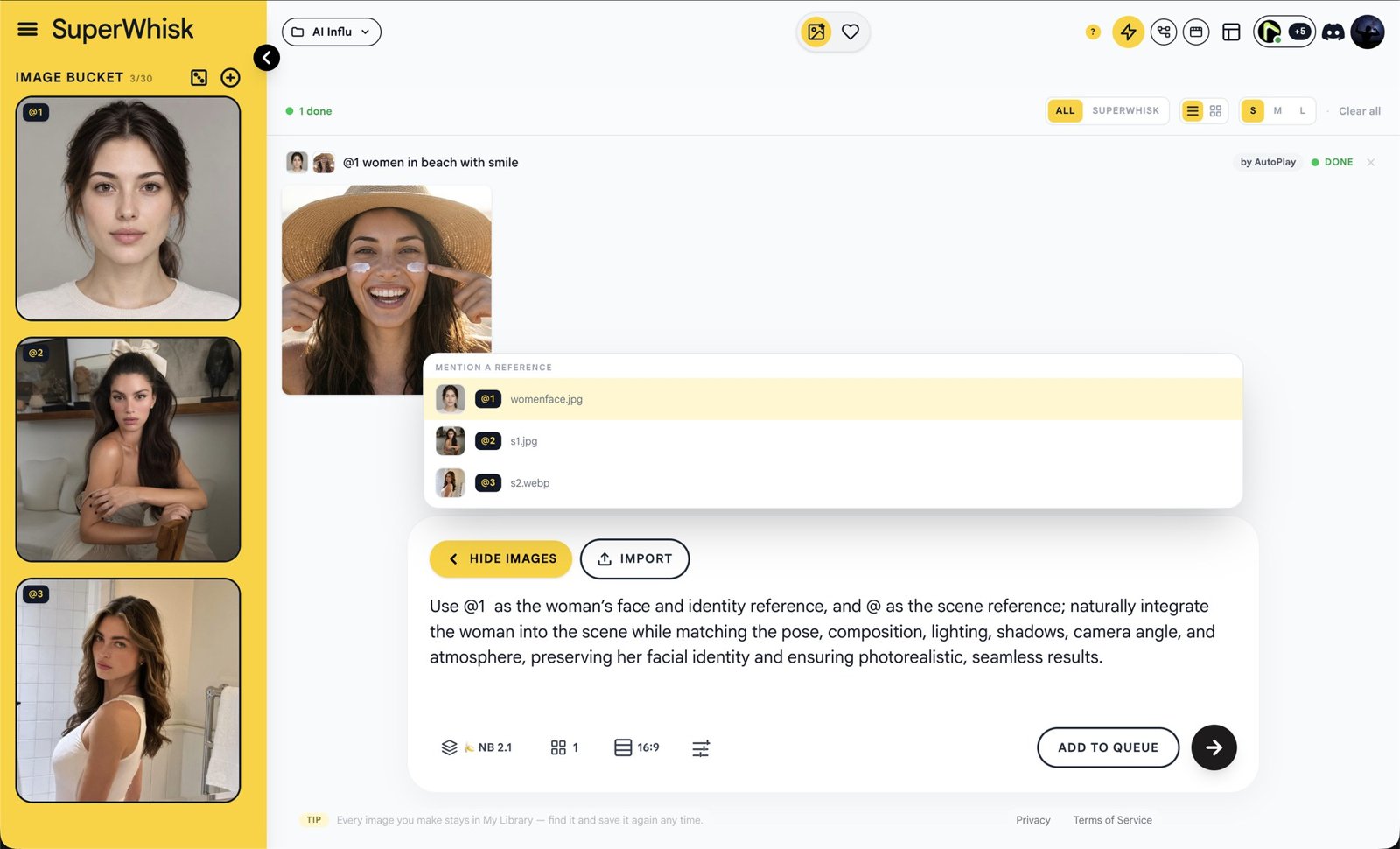
Upload your reference images and SuperWhisk tags each one automatically — by its file name or by a number. Type @ and the tag in any prompt, and that image is attached for you.
 girl.png
 red-car.png
 beach.png
Tag by file name (above), by number (@1, @2, @3) or with your own custom names.
Type @ and pick from the list — no need to remember names.
Each prompt gets only the images it names. Same girl, same car, every time.
Tell ChatGPT — or SuperWhisk's built-in Prompt Studio — your file names, and ask it to use them as @tags. Paste the result and run.
● SuperWhisk has 3 reference modes
Choose how your references attach
Start with classic Whisk. Switch to a tag mode when every prompt needs its own images.
One look for every prompt
- 1Add a subject, a scene and a style image.
- 2Paste your prompts.
- 3Every prompt uses all of your images.
● Parallel accounts
More accounts.
Less waiting.
One Flow account works through a big batch slowly and stops at its limit. Connect your other Flow accounts and a run shares the prompts between them — all generating at the same time.
A Chrome window opens, you sign in to Google Flow, and SuperWhisk finds the account by itself. Up to 10 accounts.
Each account uses its own Google Flow credits and limits.
● Nodes · Workflow builder
Build a workflow once.
Run it forever.
A visual canvas in the spirit of ComfyUI. Drop in blocks, connect the dots and press Run — SuperWhisk does every step, from the first prompt to the finished clip.
Search or browse the block list — Input, AI, Images, Video, Your turn and Output — and place what you need on the canvas.
Join dots of the same colour. Nothing to configure — the colours tell you what fits where.
Press Run and every step happens in order. Save the graph to My Graphs and run it again any time with new prompts.
Every block you need
Start from Examples, keep your own in My Graphs, and export or import graphs as files.
● No API key needed
Stop paying to write prompts.
Most AI tools ask for an OpenAI or Gemini API key, then bill you for every request. In SuperWhisk, the AI Writer node and AI Prompt Studio use ChatGPT or Gemini for free — no key, no billing, and no limit from us.
- ✕Create an API key and add a payment card
- ✕Pay for every prompt you generate
- ✕Watch usage and budgets as batches grow
- ✕Keys to copy, store and keep secret
- ✓No API key — just sign in to ChatGPT or Gemini
- ✓$0 for prompt writing, no billing to set up
- ✓Write 1 or 100 prompts, as often as you like
- ✓Switch between ChatGPT and Gemini in one click
Works through your own ChatGPT or Gemini web sign-in. SuperWhisk adds no cost or cap; OpenAI's and Google's own fair-use limits for their apps still apply.
● Built-in video editor
Cut the final video without leaving SuperWhisk
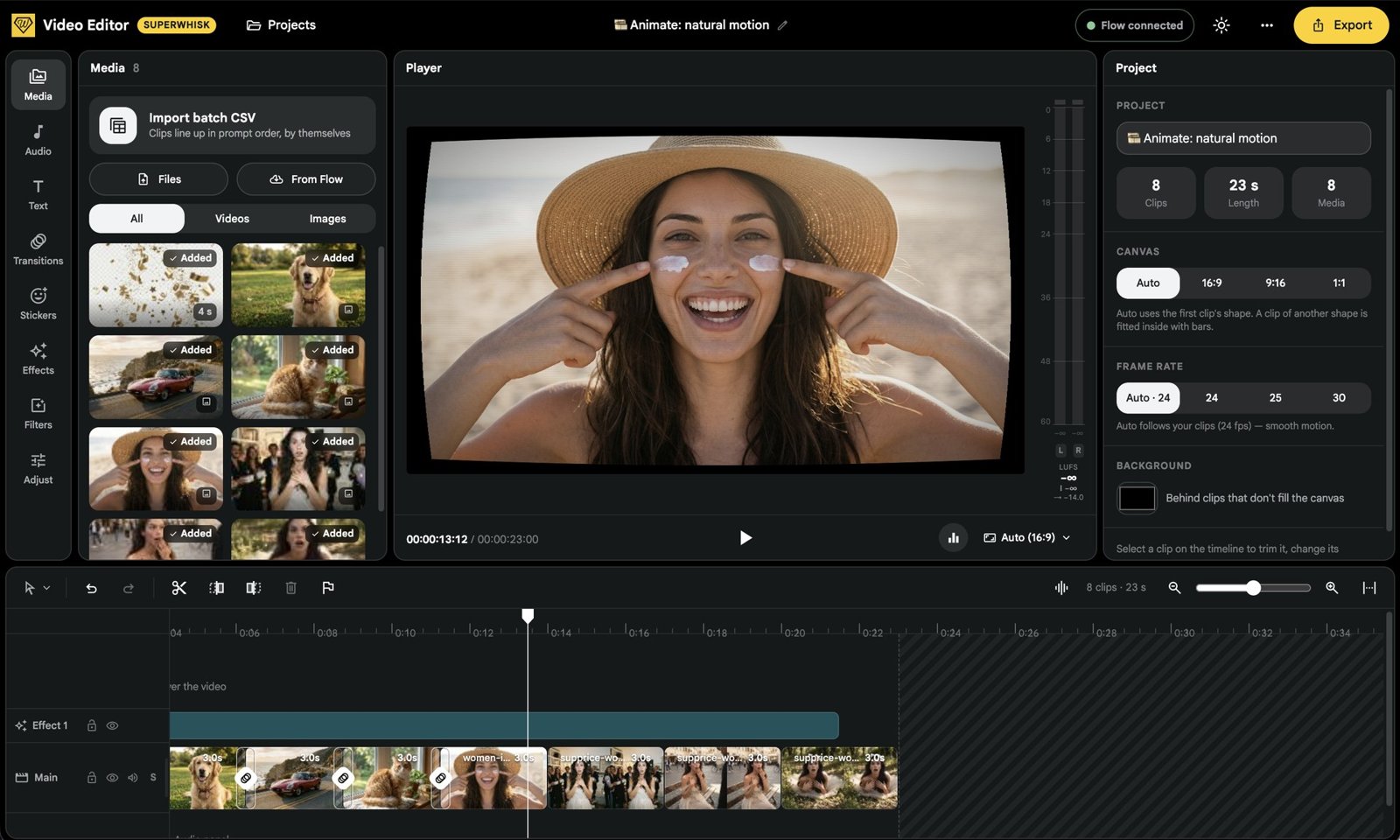
Your images and clips go straight onto a timeline. Trim, add transitions, effects, text and music, then export — no CapCut, no downloading and re-uploading.
Add from Flow or your files. Import a batch CSV and clips line up in prompt order by themselves.
Drop in music and keep it at the right level with the built-in loudness meter.
Put titles and captions over your video on their own track.
Link every clip to the next with a smooth transition.
Drop fun overlays on top of any clip.
Add a look like Old TV across the whole timeline on its own effect track.
Change the mood of a clip and fine-tune how it looks.
Split, trim and delete right on the timeline, with undo and markers.
Auto follows your first clip. Other shapes fit inside with bars in the colour you choose.
Auto matches your clips for smooth motion, or pick a fixed rate.
Each edit is kept as a project you can reopen. Export the finished video when it's ready.
● More tools
Everything around your images
Write prompts with AI, bring images to life and keep every output organised.
Type an idea, pick a style, shot and lighting, and get up to 100 ready prompts from Gemini or ChatGPT — without paying for an API.
Turn any finished image into a short clip — just describe how it should move.
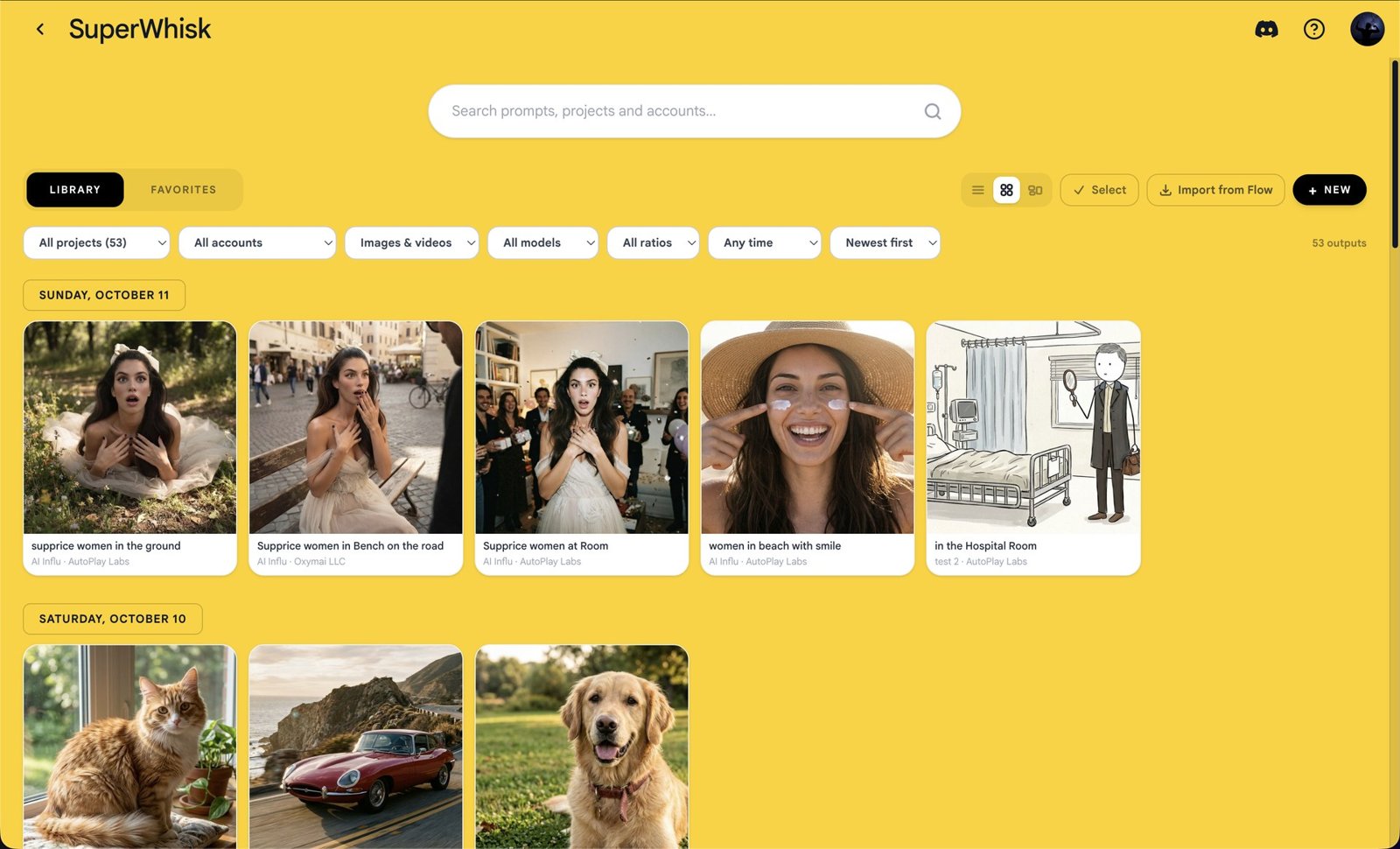
Search every output by project, account, model, size and date. Import from Flow and save in bulk.
Keep each project's images in its own folder, and heart the best ones to find them fast.
● Why SuperWhisk
Built for people who make a lot of images
The same Subject, Scene and Style layout you already know. Nothing new to learn.
Images are made with your Google Flow account and its credits.
Every image downloads into the folder you pick, as it's made.
A real desktop app on both, with the same features.
A full list of prompts, files and accounts for every run.
Download in standard size or a sharper 2K version.
Set a random delay between tasks so big batches run smoothly.
NB 2 Lite for speed, NB 2.1 for volume, NB Pro for best quality.
● Download
Native on Mac and Windows
The same app, the same features. Install it, sign in to Google Flow and start whisking.
Version 1.0.1 · released 13 OCT 2026 · Requires a Google Flow account in a country where Flow is available.
Questions? We've got answers.
AutoToolsLabs support lives in Discord. Ask in #support and the team replies in under 24 hours, most within two.
Join the Discord→Google closed Whisk as a separate app and moved its features into Google Flow. SuperWhisk gives you the Whisk-style workspace back, running on your Flow account.
● Get started
Ready to bring Whisk AI back?
Paste your prompts, tag your images and let SuperWhisk do the rest.
SuperWhisk is an independent product, not affiliated with or endorsed by Google. Google, Whisk, Flow and Veo are trademarks of Google LLC.